zondag 13 oktober 2024

Squeezebox radio working again with Lyrion Media Server

 I am a big fan of the squeezebox Radio but when Logitech decided to stop their service it took me a while to understand that that was why the Squeezebox radio could no longer connect.
The fact it only supports 2.4 Ghz always made the connection a bit sensitive.

I had a small windows Machine that I used for playing audio using Foobar.
It was running Windows 10 Pro and could not be upgraded to Win 11 so I decided to switch to Linux.

I opted for Linux Mint Cinnamon and Lyrion Media server below the specs:

--------------
System:
  Kernel: 6.8.0-45-generic arch: x86_64 bits: 64 compiler: gcc v: 13.2.0
  Desktop: Cinnamon v: 6.2.9 tk: GTK v: 3.24.41 wm: Muffin dm: LightDM
    Distro: Linux Mint 22 Wilma base: Ubuntu 24.04 noble
Machine:
  Type: Desktop Mobo: ASRock model: Q1900TM-ITX serial: <superuser required>
    UEFI: American Megatrends v: P1.60 date: 03/01/2018
Audio:
  Device-1: Intel Atom Processor Z36xxx/Z37xxx Series High Definition Audio vendor: ASRock
    driver: snd_hda_intel v: kernel bus-ID: 00:1b.0 chip-ID: 8086:0f04
  Device-2: C-Media DSD TECH USB Audio Device driver: hid-generic,snd-usb-audio,usbhid type: USB
    rev: 2.0 speed: 12 Mb/s lanes: 1 bus-ID: 1-1:2 chip-ID: 0d8c:0147
  API: ALSA v: k6.8.0-45-generic status: kernel-api
  Server-1: PipeWire v: 1.0.5 status: active with: 1: pipewire-pulse status: active
    2: wireplumber status: active 3: pipewire-alsa type: plugin

------------


--------------

And here the Squeezebox player info:

I can say it is very stable running for months already.
The only tweak I used was in the community Firmware for Touch/Radio/Controller (v0.0.9)
Go to Settings:

and there checked the box and everything else default:

 For a friend I installed Linux Mint and Lyrion Media Server on a HP T630 Thin Client and that is working also flawlessly. The T630 is running headless and connected Wireless to his home router and serving 2 Squeezebox Radio's.

So to conclude
You can still enjoy your Squeezebox Radio. It only costs about 120 Euro if you have no old hardware lying around and some time to install the software

Enjoy!

Switched my small audio Windows machine from Win 10 to Linux Mint and connected Mytek DSD 192 DAC

 I realized that My small audio PC running Windows 10 Pro could not be upgraded to Win 11 because it is too old. Because Win10 will no longer be supported after Oct 2025 I decided to switch to Linux

Machine:
  Type: Desktop Mobo: ASRock model: Q1900TM-ITX
UEFI: American Megatrends v: P1.60 date: 03/01/2018

I chose Linux Mint Cinnamon 22 and it is working perfectly

Connecting Mytek DAC 192 DSD

Connecting to my DAC Mytek dsd 192 was a bit of a challenge. Under Windows I used USB.
Googling I found that there is no  Linux  USB driver from Mytek.

Luckily this ASrock Motherboard also has a TOSLINK Optical connection that  allows me to connect to the Mytek.
That works fine but I realized if I ever need to replace this ASrock Motherboard for a different one I did not want to be depending on a Motherboard with Optical out.

I found on Amazon a small box from DSD Tech:SH-AU02A USB to TOSLINK Coaxial SPDIF Audio Adapter

This way I have a broader choice when I need to replace my motherboard and still use the Mytek

I hope it helps to still use your beloved Mytek DAC


maandag 27 mei 2024

Enable NumLock at windows startup using registry

 Instead of having to go into your bios to Activate NumLock at startup you can also change the following key in Registry:

HKEY_USERS\Default\Control Panel\Keyboard\InitialKeyboardIndicators

Change value from 2147483648 to  2147483650

 As Admin:
reg add "HKEY_USERS\.DEFAULT\Control Panel\Keyboard" /v "InitialKeyboardIndicators" /d 2147483650 /f /t REG_SZ

vrijdag 8 januari 2021

[Solved]: HP Printers - A 'Printer Isn't Available' Message Displays (Android)

 Since Google Cloud print is no longer supported after Dec 31 2020. I needed something else to be able to print from my android phone to my HP Envy 4500 Printer.

After installing HP Print service plugin from Google Play Store on My Mobile I added the printer by going to the 3 dots on the right side of your screen, selected Settings and went to Discovery.
I added a name for my printer and it's IP address. 

I set the HP Print Service to ON and disabled the Default Print Service on my mobile
(Settings -> Connected Devices -> Printing)

So far so good. Now when I tried to print something from my Nexus it showed the Envy 4500 but it didn't present the Print button and it displayed the message: Printer isn't available.

I looked at the HP troubleshooting page but none of the options fixed the issue for me.

Solution:
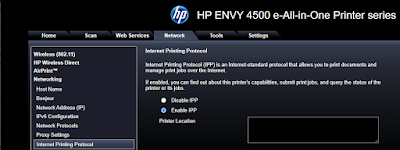
I went into my Printer Webpage (http://<IP address of your printer> and enabled IPP Protocol under Network: (Press Apply to confirm) 


Note: Web Services is not required and still disabled


Now Printing works from your android device and you can choose several options like :

- Number of Copies
- Paper size
- Color or Black and White
- Orientation
- Two sided
- Number of pages to be printed


vrijdag 8 mei 2020

Use Chrome as PDF viewer

I really like the possibility to be able to fill in PDF forms on the computer. For this I use Chrome which allows you to do exactly that.
Only now something has changed and instead of opening the PDF it only offers the download
Luckily this can be changed and PDF viewer extension is not required.


-Go into Chrome Control Sidebar (3 dots)
-Settings
-Scroll to the bottom click on Advanced
-Under Privacy And Security - Click on "Site Settings"
- Scroll to PDF Documents
- Enable "Download PDF files instead of automatically opening them in Chrome"

So you can toggle to choose if you want to download or view. I prefer view ..

donderdag 18 juli 2019

Patch PowerShell Core Security Bug to Fix WDAC Bypass

On BleepingComputer I found below Article:
Source

Microsoft has released new versions of PowerShell Core to fix a vulnerability that allows a local attacker to bypass Windows Defender Application Control (WDAC) enforcements.  This could allow the attacker to execute untrusted programs even with WDAC enabled.

To check the current version of Powershell: Start -> Run-> Type "Powershell"
This will open a Powershell window -> Type "$psversiontable"


To upgrade to a higher version of at least 6.1.5 go to https://aka.ms/pscore6 as suggested by Microsoft
Here you will find the version for Windows. This will point you to Github releases.
I chose v6.2.2 as latest stable release and downloaded the .msi file

I ran System File Checker: sfc /scannow and that showed mismatch

From Microsoft: The System File Checker (SFC) tool flags files in %windir%\System32\WindowsPowerShell\v1.0\Modules\Defender as corrupted or damaged. You see error messages such as the following: 
Hashes for file member do not match.

Because SFC incorrectly flags the files in %windir%\System32\WindowsPowerShell\v1.0\Modules\Defender, you can safely ignore the SFC error messages regarding these files.

Now you can run pwsh -v and it will tell you: PowerShell 6.2.2


donderdag 2 november 2017

Firmware download for J9802A Switch (not able to download .img file) [Solved]

You can download the latest firmware for the J9802A switch here:


This location offers PL2.08 software version for J9802A (HP 1810-8G switch) but is is not a zip file containing a .img file for upgrading but it is a .gz file containing a .bin file (If you use Chrome)

In other words it is not possible to upgrade from a windows machine.
Note: PL.2.07 does provide a zip file which contains a .img file

Solution:
Do not use Chrome but IE and Voila now from the same location a .img file can be downloaded

Strange but luckily solved by switching browser ..


Win 10 start unresponsive

Update 04 Jan 2018
Troubleshoot problems with the Start menu Win 10
Windows: The Start Menu in Windows 10 is useful, but it’s not perfect. Sometimes tiles go missing, or it won’t open at all when you click it or press the Windows key. Other times the tiles don’t refresh, or Cortana doesn’t respond. Thankfully, Microsoft’s Start Menu Repair Tool is here to help, and it’s free: startmenu.diagcab

After downloading, you can just doubleclick on the file and it will start the troubleshooter.
In my case it corrected the tiles database

+++

You notice your start menu button is no longer responding
When you decide to do a restart or sign out you get:

Task Host Window
microsoft\windows\plug and play\device install reboot required

there is a temporary solution: log out as user, kill the Task host windows and log in again. Startmenu works again !
source 

dinsdag 24 januari 2017

ASRock BIOS "Secure Flash check Fail" solved

Q1900TM-ITX

I wanted to upgrade the firmware from the existing 1.20 to 1.50 as offered by Asrock from their website.
I am running this board with 8GB RAM and Win10 Pro x64 and according to Asrock for Win10 users the firmware upgrade preference is to use Instant Flash or Internet Flash in the UEFI setup.

I tried both options and always failed with a popup box stating "Secure Flash Check Fail" message.
Together with asrock support I tried several options to get either Instant Flash or Internet Flash to work.

Both to no avail. Internet flash did not detect internet and always asked to check my internet settings
and instant flash always complained "Secure Flash check Fail"

Solution: all done within Win10
I went to the AMI Megatrends Website to get:
AMIBIOS_and_Aptio_AMI_Firmware_Update_Utility.zip

unpacked the file and went to
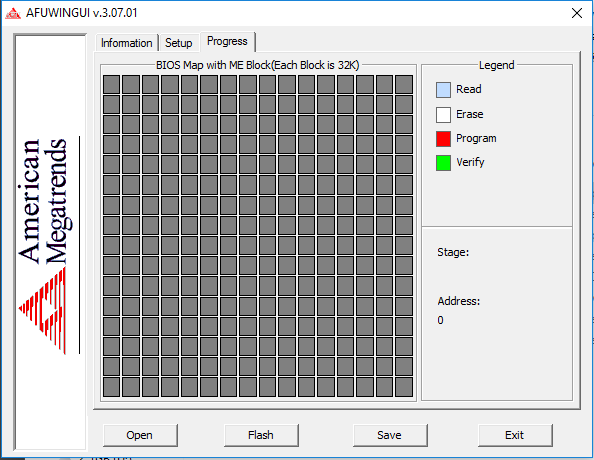
\AMI\AMIBIOS_and_Aptio_AMI_Firmware_Update_Utility\amiflash\Aptio\afuwin\64\afuwin64\AfuWin64 and started AFUWINGUI.EXE

Flashed Asrock Bios from 1.20 to 1.50 using AMI Megatrends Aptio AFUWINGUI V.3.07.01 x64 with the following setup:

Tick the following boxes:
Program all Blocks
Main BIOS Image
Boot Block
NVRAM
Do not Check ROM ID


Bios 1.50 downloaded from Asrock site and renamed to Q1900TM150.ROM
After completion, shutdown PC
At next boot goto F2 Bios setup, F9 Load UEFI defaults, F10 Save and reboot again.

After that, get into updated BIOS using F2 and adjust  to your liking.
Hope it helps


dinsdag 20 september 2016

Crucial SSD utility reports


source

My crucial SSD utility reported that I should optimize my SSD performance by disabling 8.3 file name creation on all NTFS partitions. 

The use of 8.3 file names and directories for all long file names and directories on NTFS partitions may decrease directory enumeration performance. An 8.3-compliant file name refers to MS-DOS file-naming conventions. These conventions restrict file names to eight characters and optional extensions to three characters.

This article describes a method of disabling 8.3 file name creation on all NTFS partitions. 

Note: Although disabling 8.3 file name creation increases file performance under Windows, some applications (16-bit, 32-bit, or 64-bit) may not be able to find files and directories that have long file names.


Windows Vista, Windows Server 2008, Windows 7, Windows Server 2008 R2, Windows 8, and Windows Server 2012

To disable 8.3 name creation on all NTFS partitions, type fsutil.exe behavior set disable8dot3 1 at an elevated command prompt, and then press Enter.

This operation takes effect immediately (no restart required).

Notes 
When a volume is not specified, the operation updates the registry value:

  • 0 - Enable 8dot3 name creation on all volumes on the system
  • 1 - Disable 8dot3 name creation on all volumes on the system
  • 2 - Set 8dot3 name creation on a per volume basis
  • 3 - Disable 8dot3 name creation on all volumes except the system volume
When a volume is specified, the operation updates the individual volume's on disk flag. This operation is meaningful only if the registry value is set to 2.
  • 0 - Enable 8dot3 name creation on this volume
  • 1 - Disable 8dot3 name creation on this volume

For more information about FSUTIL.EXE 8dot3name, see the following TechNet article:


zondag 8 mei 2016

Lubuntu Remote XRDP and VNC blank desktop [Solved]


I installed xrdp and x11vnc on my Lubuntu 16.04LTS box
Trying to access my Lubuntu using XRDP  and vnc gave me a blank desktop on my win10x64 desktop (using mstsc.exe for rdp)

I read somewhere to install lxde-common, so i did (apt-get install lxde-common)
And yeah it worked for xrdp (the screen icons are a bit different but I can live with that)
(no tweaking done)

To fix the blank desktop using VNC you have to uncomment 2 lines which are commented by default after installation of x11vnc (below the setting where the 2 lines are uncommented which fixed the blank desktop)

root@ub:~/.vnc# more xstartup
#!/bin/sh

# Uncomment the following two lines for normal desktop:
unset SESSION_MANAGER
exec /etc/X11/xinit/xinitrc

[ -x /etc/vnc/xstartup ] && exec /etc/vnc/xstartup
[ -r $HOME/.Xresources ] && xrdb $HOME/.Xresources
xsetroot -solid grey
vncconfig -iconic &
x-terminal-emulator -geometry 80x24+10+10 -ls -title "$VNCDESKTOP Desktop" &
x-window-manager &
root@ub:~/.vnc#

Strange is that I see some LXDE entries are added in the autostart which I have not done myself:

LUbuntu light-locker-settings didn't start (cannot activate screen dim)

Lubuntu based on Ubuntu 16.04LTS
When I click on Light locker settings it does not show the menu for light-locker and worse I noticed that my screen does not dim at all

In order to make Screen dim work I installed xscreensaver but did not work either: When i clicked on the screensaver icon in /usr/share/applications it said the following:

The XScreenSaver daemon doesn't seem to be running on ":0". Launch it now?

In order to launch it automatically  I added xscreensaver -nosplash   in
Preferences -> Default Applications for LXSession -> Autostart

Now it is automatically started and after I adjusted the timings for the screensaver it works as intended.

zaterdag 7 mei 2016

Deep sleep mode Nexus 5x and Whatsapp

I noticed that I did not receive whatsapp notifications on my phone while it was in sleep mode.

I'm going to see if disabling deep sleep for Whatsapp solves it.
(source)

 
You can turn this off per app. Go to:

Settings > Battery 
Touch the menu icon (three dots)
Touch Battery Optimization and touch the down arrow, followed by All apps
Tap on the app that you want to turn off optimization
Select Don't Optimize and touch Done.

zondag 17 april 2016

Patch update April 2016 issue [Solved]

Win7 64 bit fully patched (up to patch update April 2016) got into issues after receiving April update. Windows shutdown unexpectedly and after restart it looked like it came into a boot loop.
One of the things was >50% CPU for svchost and everything else brought the cpu to 100%
I suspected a temperature issue due to the high cpu but I came across an article which solved it.

What I did to resolve it was found in this article:
Set windows update to "Never check ..."
Reboot pc and now CPU load was back to normal
Install KB3145739 manually. Go to Microsoft website to download and then install.
Next you should restart and finally you can check for updates in manual mode.
Doing manual update after KB3145739 install showed 14 updates left
These patches installed fine while watching CPU load en CPU Temp and the pc went installing these patches without a hitch.


donderdag 28 januari 2016

Windows 10 keeps reinstalling KB3119142

Source

KB3119142 (Update for Microsoft Visual C++ 2012 Update 4 Redistributable Package) keeps downloading in the Windows 10 Update app. Windows apparently attempts to reinstall it each time, and each time it installs successfully according to the log screen.

Solution:
Right click the Windows Start Icon at the lower left of your screen in the taskbar and click on Programs and Features at the top of the list there. If you are familiar with Control Panel, you can also go there and click on Programs and Features.

Right click on the MS C++ 2012 listing there. Click on Change and then Repair. Restart your computer. I had the same problem since installing 11099 and found this answer on Win 10 Insider Forum and it worked for me.

After this it will successfully install the update and reports your machine as up to date

woensdag 19 november 2014

[Solved] Win8.1 hangs on shutdown with Avast 2015 free

source 

Today I installed the patches from Microsoft together with Avast2015 Free.When I decided to reboot the PC it got stuck in either shutdown, please wait or Restart.

I read an article that stated that Avast 2015 was not compatible with the optional KB3000850.
After uninstalling this patch Avast did run without issues.


Update:
Avast has solved the issue. Before installing KB3000850 you should check if
C:\Windows\System32\drivers\aswsnx.sys should has a higher version than 1.0.2208.712
So check this version before installing this Microsoft update